Best Home Security Systems for Renters (No-Install Options)
| PHT Security Team
Renting comes with a specific kind of security problem that homeowners never really have to think about. No drilling into the walls. No running wires through the ceiling. And if you’re the type who moves every year or two once the lease is up, sinking money into a system that’s bolted to one address just doesn’t add up. (Still weighing whether a system is worth the cost at all? This breakdown is a good starting point.)
The good news? The security industry finally caught up. You’re no longer stuck choosing between “no protection” and “a hardwired system I’ll have to abandon the second I move out.” There’s now a whole category of wireless, peel-and-stick, contract-free systems built specifically with renters in mind.
This guide covers the best home security systems for renters in 2026: what actually matters when you’re choosing one, which brands hold up in practice, and how to avoid the small mistakes that end up costing people their security deposit.
What Makes a Security System Renter-Friendly
Before comparing brands, it helps to know what you’re actually screening for. Not every system marketed as “wireless” is genuinely rental-safe. Here’s what separates the systems that work for renters from the ones that don’t.
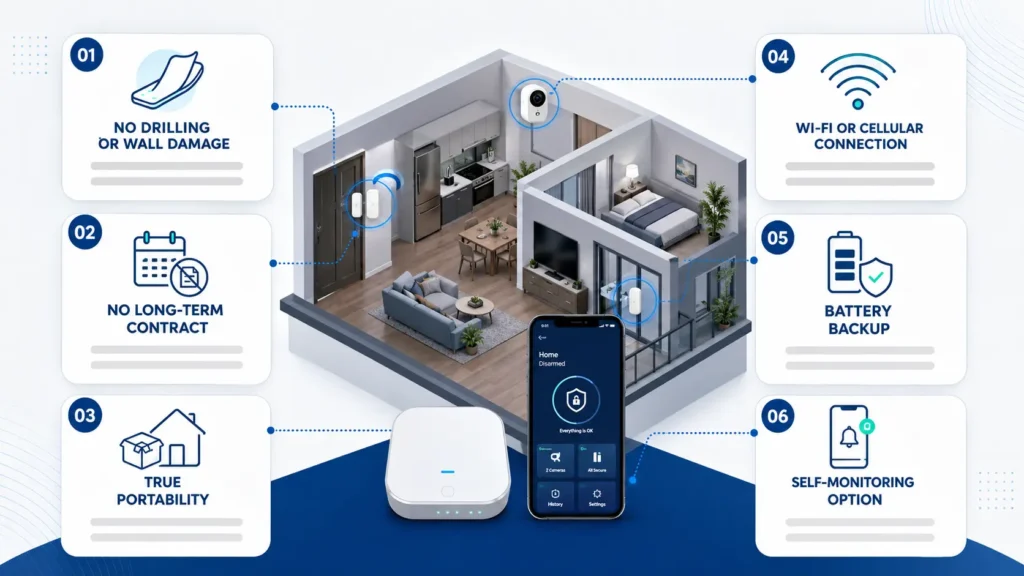
No drilling or wall damage. Sensors should attach with adhesive strips or Command-style mounts, not screws. This is the single biggest factor in whether you get your full deposit back.
No long-term contract. A lot of the big legacy brands still lock you into two or three years of monitoring. If you might move before that term is up, you’re either stuck paying for a system at an address you no longer live in, or you’re eating a cancellation fee.
True portability. The system should be easy to unmount, pack up, and reinstall at your next place without buying new equipment or paying a transfer fee.
Cellular or Wi-Fi based, not landline. Most rentals don’t have a landline anyway, so this is less of an issue than it used to be, but it’s worth confirming the base station doesn’t require one.
Battery backup. If your landlord controls the breaker box or there’s a power outage, you want a system that keeps working, ideally with cellular backup so it doesn’t rely on your home Wi-Fi either.
Self-monitoring option. Not everyone wants to pay a monthly fee. Several systems now let you monitor your own alerts through an app for free, with professional monitoring as an optional upgrade rather than a requirement. If you’re not sure which route makes sense for your situation, it’s worth reading up on alarm monitoring vs self-monitoring before you commit to a plan.
The Best Home Security Systems for Renters
1. SimpliSafe — Best Overall for Renters
SimpliSafe has built its reputation on exactly this use case for years. The equipment is wireless, the sensors mount with adhesive, and there’s no long-term contract required to use it. You buy the base kit and sensors outright, set them up yourself in under an hour, and take the whole system with you when your lease ends.
What makes it a strong pick for renters specifically is flexibility on price and coverage. You can start with a small kit for a studio or one-bedroom and add sensors individually as you figure out where your weak points are, rather than being forced into a bundled package sized for a house you don’t live in.
Good for: People who want a proven, well-supported system with the option of professional monitoring later, without being locked into anything now.
Watch for: The free monitoring tier is limited. If you want video verification or professional response, you’ll need one of the paid plans.
2. Abode — Best for Smart Home Integration
Abode consistently comes up as the top pick for renters because it checks every box on the “won’t get you in trouble with your landlord” list. Installation is drill-free, the doorbell camera is battery-powered so there’s no wiring involved, and moving the system to a new address doesn’t cost you anything extra.
The starter kit typically includes a hub, a key fob, a door or window sensor, and a motion sensor, which is enough to cover a one-bedroom apartment’s main entry points right out of the box.
Where Abode pulls ahead of competitors is smart home compatibility. It works with Apple HomeKit, Google Assistant, and Z-Wave devices, so if you already have smart locks or smart lighting, it’s the easiest system to fold into an existing setup. If you’re not sure how smart locks, lighting, and alarms actually work together, our smart home security system guide breaks down how it all connects.
Good for: Renters who want a self-monitoring option with no monthly fee, plus the flexibility to add professional monitoring only when they want it.
Watch for: The self-monitoring plan means alerts go to your phone, not a monitoring center. If nobody sees the alert, nobody responds.
3. Ring Alarm — Best for Renters Already Using Ring Doorbells
If you already have a Ring video doorbell, adding the Ring Alarm system is the path of least resistance. Everything lives in one app, sensors are adhesive-mount, and there’s no contract requirement for the base equipment.
Ring’s biggest advantage for renters is price. The starter kits are among the cheapest on the market, and the optional Ring Protect Plus plan bundles professional monitoring with video storage for a relatively low monthly cost compared to competitors.
Good for: Budget-conscious renters, especially those who already use Ring products or live in a building where package theft or porch visitors are the main concern.
Watch for: Ring’s data practices and police-sharing partnerships have drawn privacy criticism in the past. If that matters to you, it’s worth reading their current privacy policy before buying in.
4. Cove — Best for No-Contract Simplicity
Cove has positioned itself as a straightforward, no-frills alternative to SimpliSafe and Ring. Setup is entirely DIY, sensors are wireless and adhesive, and Cove is explicit about not requiring long-term contracts, which makes it a strong no-contract option for renters and budget-conscious buyers.
One detail renters like: if a piece of equipment breaks, Cove replaces it for free for as long as you’re an active monitoring customer, which matters if you’re the kind of renter who’ll be uninstalling and reinstalling sensors every year or two.
Good for: People who want a simple, no-nonsense system without a lot of smart home extras to configure.
Watch for: The app and equipment lineup are less feature-rich than SimpliSafe or Abode, so if you want a lot of customization, this may feel limited.
5. Wyze Home Monitoring — Best Budget Pick
Wyze built its name on cheap, reliable cameras, and its home monitoring system follows the same pricing playbook. It’s one of the least expensive full systems you can buy, with adhesive sensors and a monthly monitoring fee that undercuts most competitors by a wide margin.
The tradeoff? Wyze is still fairly new to professional monitoring specifically, so response times and customer service haven’t been road-tested over as long a track record as SimpliSafe or ADT.
Good for: Renters on a tight budget who mainly want basic entry alerts and are comfortable with a less established monitoring provider.
What About Standalone Cameras Instead of a Full System?
Not every renter needs a full alarm system with sensors on every door and window. If your main concern is package theft, keeping an eye on the front door, or just having a record of who’s coming and going, a standalone battery-powered camera might be all you actually need.
Battery or plug-in cameras from brands like Ring, Wyze, and Eufy mount with adhesive or a simple stand, need no wiring, and can be moved from apartment to apartment in minutes. Deciding between a wireless or wired camera setup and figuring out whether you need indoor, outdoor, or both will narrow things down fast. Cameras alone aren’t a substitute for a monitored alarm system if you’re worried about break-ins specifically, but for a lot of renters, a doorbell camera plus one or two indoor cameras covers the real risk without the cost of a full system.
Legal Considerations Before You Install Anything
This is the part most buying guides skip, and it’s the part that actually determines whether your system is a smart purchase or a lease violation.
Check your lease for an “alterations” or “modifications” clause first. Most leases don’t mention security cameras by name, but they often include a general clause prohibiting alterations to the property without written consent, and that clause is where most security camera disputes with landlords actually start.
Cameras inside your own unit are generally the safest bet. As long as installation doesn’t involve drilling or permanent changes, and the camera only captures your own private living space, landlords typically have little grounds to object, since the device is considered your personal property.
Never point a camera at shared spaces. Hallways, shared entryways, parking areas, and other tenants’ windows are off-limits. Some states allow tenants to install indoor cameras without notifying the landlord at all, but only as long as the camera doesn’t capture shared or private areas used by other people.
Know your state’s audio recording laws. A handful of states, including California, Florida, Illinois, and Washington, are “all-party consent” states, meaning everyone in a conversation has to agree before audio can legally be recorded — even inside your own apartment if you have guests over. If your camera records audio by default, check whether you need to switch it off when people visit.
When in doubt, get it in writing. If you want to install anything outside your unit, or you’re unsure whether your lease allows it, a quick written request to your landlord protects both of you and avoids a dispute later.
How to Choose the Right System for Your Situation
There’s no single “best” system for every renter, because the right choice depends on your layout, your budget, and how much you move.
If you live alone in a studio or one-bedroom, a compact kit like Abode’s Smart Security Kit or a SimpliSafe starter kit covers your main entry points without overspending on sensors you don’t need.
If you’re on a tight budget, Wyze or Ring will get you real protection for the lowest upfront and monthly cost.
If you already use smart home devices, Abode’s HomeKit and Z-Wave support will save you the headache of running multiple disconnected apps.
If you move often, prioritize systems with no contract and no transfer fees over ones with slightly better features. Portability should outweigh bells and whistles if relocating every year is your reality.
If your main worry is package theft or knowing who’s at the door, a standalone doorbell camera may solve the problem on its own, without the cost of a full sensor-based system.
If you eventually buy a home or your landlord approves professional installation, it’s worth comparing DIY setups against a professionally installed residential security system, since permanent wiring and professional monitoring do offer some coverage advantages a peel-and-stick kit can’t fully match.
Renting in the Houston area specifically? Our local comparison of the best home security systems in Houston covers a few regional factors — storm-related power outages, HOA rules — that don’t apply everywhere.
FAQs About Home Security Systems for Renters
Can I install a security system in my apartment without my landlord’s permission?
In most cases, yes, as long as the system doesn’t require drilling, wiring, or any permanent changes to the unit. Adhesive-mount sensors and battery-powered cameras are generally considered personal property, not property modifications. That said, always check your lease for an “alterations” clause first, since some leases restrict any device installation regardless of how it’s mounted.
Will a wireless security system damage my walls or leave marks?
Adhesive-mount sensors from brands like SimpliSafe, Abode, and Ring are designed to come off cleanly, but results can vary depending on your wall paint and how long the sensor has been in place. If you’re worried about residue, test the adhesive on an inconspicuous spot first, or use removable mounting products designed for rentals.
Do I need professional monitoring, or can I monitor the system myself?
It depends on how much you want to rely on your own attention. Self-monitoring is free with most systems and sends alerts straight to your phone, but nobody responds if you miss the notification. Professional monitoring costs more each month but means a monitoring center contacts emergency services on your behalf, even if you’re asleep or your phone is off.
What happens to my security system when I move out?
Because these systems are wireless and adhesive-mounted, you simply unmount the sensors, pack up the base station, and reinstall everything at your new address. There’s typically no transfer fee, and most brands let you keep the same account and app across multiple homes.
Are cheaper systems like Wyze actually reliable, or is it worth paying more?
Budget systems can absolutely cover the basics, entry alerts, motion detection, and app notifications, but they tend to have less established monitoring infrastructure and slower customer support than brands like SimpliSafe or ADT. If cost is your main constraint, a budget system is still far better than no protection at all.
Can my landlord make me remove my security cameras?
Generally not if the cameras are inside your own unit, don’t require permanent modifications, and only capture your own living space. Landlords have more legitimate grounds to object if a camera points into a shared hallway, a neighbor’s window, or another area where people have a reasonable expectation of privacy.
Final Thoughts
The idea that renters can’t have real home security is a few years out of date at this point. Between adhesive-mount sensors, no-contract monitoring plans, and battery-powered cameras, it’s entirely possible to build a system that protects your space, respects your lease, and travels with you every time you move.
If you’re still not sure what you need, start small. A base station, one entry sensor, and a camera by the front door will tell you a lot about where your actual gaps are, and you can always build out coverage from there. What matters most isn’t finding the flashiest system. It’s picking equipment that won’t cost you your deposit or tie you to a place you’re planning to leave.
Already have a system in place but it’s a few years old? Here are 7 signs it’s overdue for an upgrade.

PHT Security Team
We believe everyone deserves to feel safe at home and at work. Our team shares practical security advice, helpful resources, and the latest insights on ADT systems, security cameras, smart home technology, and commercial security to help you make informed decisions. Whether you’re exploring your first security system or upgrading your current setup, we’re here to help you protect what matters most.
PHT Security Team
we believe everyone deserves to feel safe at home and at work. Our team shares practical security advice, helpful resources, and the latest insights on ADT systems, security cameras, smart home technology, and commercial security to help you make informed decisions. Whether you’re exploring your first security system or upgrading your current setup, we’re here to help you protect what matters most.